A WireGuard setup on your own server gives you a dedicated IP in the country you pick, zero traffic logging, and full control over the configuration. WireGuard handles the tunnel: ChaCha20 encryption, Curve25519 key exchange, 4,000 lines of code (OpenVPN has 100,000+), and has been built into the Linux kernel since version 5.6. In throughput tests, it consistently beats OpenVPN by 2–3x on the same hardware.
We'll use wg-easy, a Docker image that bundles a WireGuard VPN server with a web admin panel. You add clients, download configs, and scan QR codes from a browser.
What You'll Need for WireGuard Setup
- An is*hosting VPS with Ubuntu 22.04 or 24 — this WireGuard Ubuntu 22.04 guide works on both
- A computer or phone to connect from
- About 15 minutes
If you already have a VPS with Ubuntu and SSH access, skip to Step 3.
Step 1: Order a VPS
Head to is*hosting and order a VPS, for example the Lite plan:
- CPU: 1 vCPU
- RAM: 1 GB
- Storage: 20 GB SSD
- OS: Ubuntu 24
- Location: the country you want your IP address in
- Price: $6.99/mo (or $5.94/mo on an annual plan)
The location of your WireGuard VPS determines your exit IP. If you want to appear as a German user, pick Germany. For a US IP, pick the US. is*hosting has 40+ locations across five continents.
A 1 GB RAM VPS handles 10–20 simultaneous WireGuard connections. The limiting factor at that point becomes bandwidth, and the Lite plan includes a 1 Gbps port with 2 TB of monthly transfer.
After payment, you'll receive an IP address and root password via email. Save both.
That's all the infrastructure you need. Here's how to set up WireGuard on it.
VPS
Deploy your own WireGuard VPN on a KVM VPS with a dedicated IP and a 1 Gbps port — in 40+ locations worldwide.
Step 2: Connect to Your WireGuard Ubuntu Server via SSH
Mac: Open Terminal (Cmd+Space, type "Terminal", Enter).
Windows: Download Tabby or use PowerShell.
ssh root@YOUR_IP_ADDRESSEnter your password. The characters won't appear on screen while typing; that's ok. When you see root@server:~#, you're connected.
Step 3: Install Docker
Docker is the fastest path to a working WireGuard server setup on Ubuntu.
On a fresh WireGuard Ubuntu install, start by updating the package list:
apt update
curl -fsSL https://get.docker.com | bash
Wait 1–2 minutes for the installation to finish.
Step 4: Choose Admin Credentials
wg-easy v15 creates the admin account for the web panel on first start. Pick a username and a password now; you'll put them in the config in the next step:
- Username: at least 2 characters
- Password: at least 12 characters
You don't need to generate a password hash: that was required only in older wg-easy versions.
Step 5: Create and Start WireGuard Server Setup
This is where the WireGuard VPN server configuration lives:
mkdir /root/wg-easy
nano /root/wg-easy/docker-compose.yml
Paste the following. Replace three values: INIT_USERNAME and INIT_PASSWORD with the credentials from Step 4, and INIT_HOST with your VPS IP:
services:
  wg-easy:
    image: ghcr.io/wg-easy/wg-easy:15
    container_name: wg-easy
    environment:
      - INSECURE=true
      - INIT_ENABLED=true
      - INIT_USERNAME=YOUR_USERNAME
      - INIT_PASSWORD=YOUR_PASSWORD
      - INIT_HOST=YOUR_VPS_IP
      - INIT_PORT=51820
      - INIT_DNS=1.1.1.1,8.8.8.8
    networks:
      wg:
        ipv4_address: 10.42.42.42
        ipv6_address: fdcc:ad94:bacf:61a3::2a
    volumes:
      - etc_wireguard:/etc/wireguard
      - /lib/modules:/lib/modules:ro
    ports:
      - "51820:51820/udp"
      - "127.0.0.1:51821:51821/tcp"
    cap_add:
      - NET_ADMIN
      - SYS_MODULE
    sysctls:
      - net.ipv4.ip_forward=1
      - net.ipv4.conf.all.src_valid_mark=1
      - net.ipv6.conf.all.disable_ipv6=0
      - net.ipv6.conf.all.forwarding=1
      - net.ipv6.conf.default.forwarding=1
    restart: unless-stopped

networks:
  wg:
    driver: bridge
    enable_ipv6: true
    ipam:
      driver: default
      config:
        - subnet: 10.42.42.0/24
        - subnet: fdcc:ad94:bacf:61a3::/64

volumes:
  etc_wireguard:
The INIT_* variables are read only on the first start: they create the admin account and the VPN settings, so the setup wizard is skipped. If your password contains a $ sign, write it as $$ in the YAML file.
The panel port is bound to 127.0.0.1, so the panel isn't reachable from the internet; you'll open it through an encrypted SSH tunnel in Step 6. INSECURE=true lets the panel work over plain HTTP inside that tunnel.
This is the complete config for how to set up WireGuard with a web panel.
Save: Ctrl+O, Enter, Ctrl+X.
Configure the WireGuard firewall rules:
ufw allow OpenSSH
ufw allow 51820/udp
ufw enable
ufw status
Allow SSH first: once the firewall is on, it blocks every incoming connection that isn't explicitly allowed, including SSH. ufw enable warns that the command may disrupt existing SSH connections; type y to continue. ufw status displays the active rules. Check that OpenSSH and 51820/udp are on the list. The panel port 51821 doesn't need a rule: it isn't published to the internet.
Start it:
cd /root/wg-easy
docker compose up -d
The container pulls and starts in about 30 seconds. You'll see:
✔ Container wg-easy StartedStep 6: Add Clients via Web Panel
Your WireGuard VPN setup is running; now add client devices from the web panel.
The panel listens only on the server itself, so open an SSH tunnel first. Run this on your computer (not on the server) and keep the session open:
ssh -L 51821:127.0.0.1:51821 root@YOUR_VPS_IPThen open in your browser:
http://localhost:51821Sign in with the username and password you chose in Step 4.
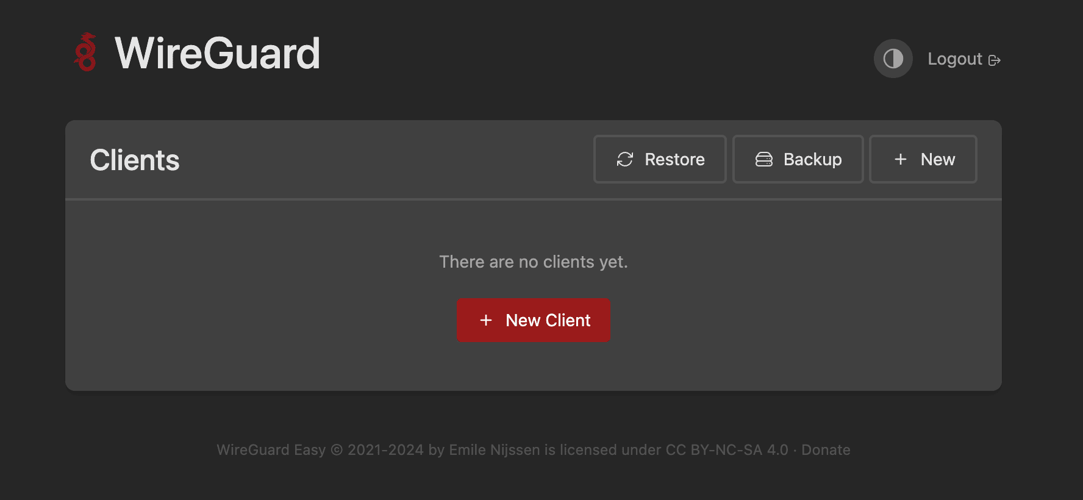
Click New Client, give it a name (e.g., "MacBook" or "iPhone"), and click Create Client. The panel generates a config file and a QR code.
For phones (iOS/Android):
- Install the WireGuard app from the App Store or Google Play
- Tap "Add tunnel" then "Scan QR code"
- Scan the QR code from the web panel (the QR code icon on the client's card)
- Toggle the connection on
For Mac/Windows/Linux:
- Download the WireGuard app
- In the web panel, click the download icon (Download Configuration) on your client's card to get the .conf file
- In the WireGuard app, click "Import tunnel(s) from file" and select the .conf file
- Click "Activate"
Check your IP at whatismyipaddress.com. It should show your VPS IP.
If the IP changed but you're still seeing DNS requests from your ISP, you have a DNS leak. Open dnsleaktest.com and run the extended test. If your ISP's DNS servers appear, open Admin Panel → Config in wg-easy and check that the DNS list contains 1.1.1.1 and 8.8.8.8. Then import the client config on your device again: wg-easy doesn't push config changes to devices.
Step 7: Lock Down the Admin Panel
Your WireGuard VPS is running. Now make sure the admin panel stays private.
Don't rely on ufw for this. Docker publishes container ports through its own iptables rules, which bypass ufw: if a port is published as "51821:51821/tcp", the panel stays reachable from the internet even without a ufw rule for it. That's why the compose file in Step 5 binds the panel to 127.0.0.1. Check it on the server:
ss -tlnp | grep 51821The output should show only 127.0.0.1:51821. If you see 0.0.0.0:51821 or [::]:51821, fix the ports line in docker-compose.yml and run docker compose up -d again.
The admin password is still in plain text in docker-compose.yml. Now that the account exists, delete all INIT_* lines from the file and recreate the container (your settings and clients are kept):
cd /root/wg-easy
nano docker-compose.yml
docker compose up -d
When you need to add a new client later, open the SSH tunnel from Step 6 again.
Updating wg-easy
Keep your WireGuard VPN server up to date by pulling the latest image:
cd /root/wg-easy
docker compose pull
docker compose up -d
The :15 tag pulls new 15.x releases, which don't include breaking changes. When a new major version comes out, read its migration guide before changing the tag. If you forget the admin password, reset it with docker compose exec -it wg-easy cli db:admin:reset.
The Detection Problem: DPI Fingerprints WireGuard Instantly

You cannot just set up a WireGuard server and forget about it…
Everything above produces a working WireGuard setup. Standard WireGuard traffic, however, can be identified by deep packet inspection (DPI) systems within milliseconds of the first handshake.
This section applies if you're using a VPN in a country with active traffic filtering: Russia, China, Iran, the UAE, Turkmenistan, or anywhere with state-level DPI. If you're on a regular ISP in Europe or the US, the basic setup above works and you can skip ahead to the FAQ.
How DPI Identifies WireGuard
WireGuard has three signatures that DPI catches:
- Fixed message type headers. Every WireGuard packet starts with a 32-bit type field (values 1, 2, 3, or 4). A DPI rule matching "UDP packet + header value 1–4 + predictable size" flags WireGuard with near-zero false positives.
- Invariant packet sizes. Handshake initiation: always 148 bytes. Response: always 92 bytes. These two fixed sizes alone are enough to fingerprint the protocol.
- High-entropy payload. Encrypted WireGuard data has maximum entropy (it looks like random bytes), which DPI systems flag as probable VPN or tunnel traffic.
China's GFW and Russia's TSPU (deployed on all major ISPs since 2024) use these three signals together. Some ISPs block WireGuard entirely; others throttle it to single-digit Kbps.
Option A: Stay on WireGuard, Add Obfuscation
A1. AmneziaWG: WireGuard Fork with Built-in Obfuscation
AmneziaWG, developed by the Amnezia VPN team, modifies the WireGuard protocol at the packet level:
- Randomizes packet sizes (the handshake is no longer fixed at 148 bytes)
- Pads packets with junk data of variable length
- Sends decoy packets before the handshake that mimic QUIC or STUN headers
- Uses the same ChaCha20/Curve25519 encryption as standard WireGuard
Install the Amnezia VPN app (amnezia.org), point it at your VPS, and it configures AmneziaWG automatically with obfuscation parameters tuned for your region.
It defeats most ISP-level DPI and some state-level systems. During periods of aggressive blocking (e.g., China's GFW tightening around political events), advanced DPI can still flag high-entropy UDP traffic regardless of size randomization.
Status as of June 2026: In early June 2026, the Amnezia Free and Amnezia Premium managed services experienced outages lasting several days following a DDoS attack on the project's infrastructure. This affected users who connected via Amnezia servers. Users who deployed AmneziaWG on their own VPS were not directly affected by the attack. However, the AmneziaWG protocol itself has been partially detected by ISPs since late 2025 (according to the Amnezia team, blocks affect about 10% of connections). Managed VPN services generally remain a target for infrastructure blocking, which is one of the reasons to deploy a VPN on your own server.
A2. wg-obfuscator: Proxy Layer for Standard WireGuard
wg-obfuscator operates as a proxy between your WireGuard client and server, transforming packets in transit:
- Randomizes handshake sizes
- Masks traffic as STUN protocol (STUN is used by video conferencing and is rarely blocked)
- Works with the standard WireGuard client — no fork required
- Has zero external dependencies
It handles ISP-level DPI reliably. The STUN masking works because filtering systems typically whitelist STUN/TURN traffic to avoid breaking video calls. State-level systems running behavioral analysis over longer time windows can still identify the pattern.
Honest assessment: wg-obfuscator adds real obfuscation, but the client-side setup requires running a separate binary on every device and managing the obfuscator process alongside the VPN connection. On iOS, it doesn't work at all. If you need multi-device obfuscation with minimal friction, AmneziaWG through the Amnezia VPN app (Option A1) handles everything in one application across all platforms.
How to Set Up wg-obfuscator
The obfuscator runs on both sides of the connection: on the server and on every client device.
Server side. The easiest approach is to replace wg-easy with wg-obfuscator-easy, a Docker container that bundles WireGuard, the obfuscator, and a web panel into a single image.
mkdir /root/wg-obf
nano /root/wg-obf/docker-compose.yml
In the YAML file, insert:
services:
  wg-obf-easy:
    image: clustermeerkat/wg-obf-easy:latest
    container_name: wg-obf-easy
    environment:
      - EXTERNAL_IP=YOUR_VPS_IP
      - EXTERNAL_PORT=57159
      - ADMIN_PASSWORD=YOUR_PASSWORD
    volumes:
      - ./config:/config
      - /etc/timezone:/etc/timezone:ro
    ports:
      - "57159:57159/udp"
      - "127.0.0.1:5000:5000/tcp"
    cap_add:
      - NET_ADMIN
      - SYS_MODULE
    sysctls:
      - net.ipv4.ip_forward=1
      - net.ipv4.conf.all.src_valid_mark=1
    restart: unless-stopped
Then ports:
ufw allow 57159/udp
cd /root/wg-obf && docker compose up -d
The panel port is bound to 127.0.0.1 for the same reason as in Step 7. Open an SSH tunnel from your computer:
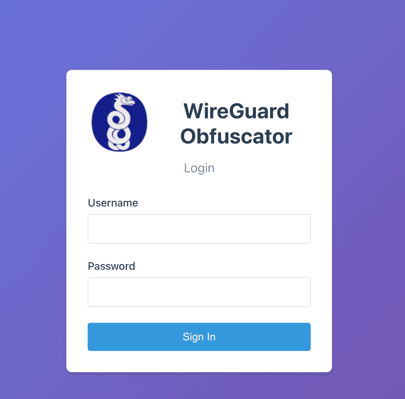
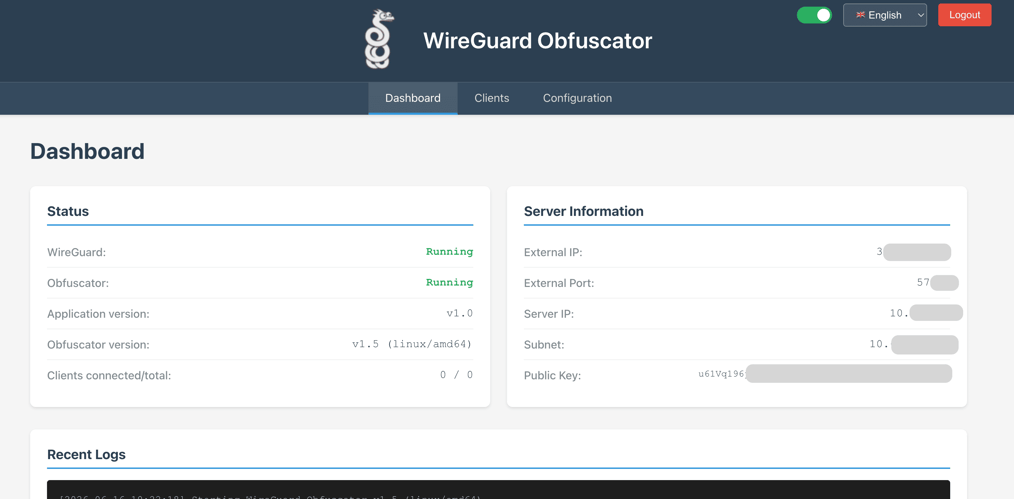
ssh -L 5000:127.0.0.1:5000 root@YOUR_VPS_IPThen open http://localhost:5000 (login: admin, password: what you set in ADMIN_PASSWORD). Go to Clients, click Add Client, create a client (e.g., MacBook), and click its name. The panel shows two configs: WireGuard Config and WireGuard Obfuscator Config. Copy each one into a file in your Downloads folder: MacBook-wireguard.conf and MacBook-obfuscator.conf.
The obfuscator config already contains the obfuscation key, your server address, and a local port. The WireGuard config already points to that local port (Endpoint = 127.0.0.1:13255), so you don't need to edit it.
Client side (Mac/Windows/Linux). Download the wg-obfuscator archive for your OS from GitHub Releases: macos-arm64.zip for Mac with Apple Silicon, macos-x64.zip for Intel Mac, linux-x64.tar.gz for Linux, windows-x64.zip for Windows. The binary is inside the wg-obfuscator folder of the archive.
Unpack it and run the obfuscator with the config from the panel. Example for Mac with Apple Silicon, version 1.6, and a client named MacBook:
cd ~/Downloads
unzip wg-obfuscator-v1.6-macos-arm64.zip
chmod +x wg-obfuscator/wg-obfuscator
./wg-obfuscator/wg-obfuscator -c MacBook-obfuscator.conf
If your browser has already unpacked the archive, skip the unzip line and use the path to the unpacked binary. The obfuscator starts a local proxy on port 13255. Import MacBook-wireguard.conf into the WireGuard app as is and connect.
The obfuscator process must be running in a terminal window while you use the VPN. Closing the terminal kills the obfuscation layer.
Client side (Android). A dedicated app is available: wg-obfuscator-android. Download the APK from the project's CI builds page (linked in the repository README), install it, then enter the obfuscation key and server address (both are in the WireGuard Obfuscator Config in the panel). The app proxies traffic from the standard WireGuard client through the obfuscator.
Client side (iOS). No iOS client for wg-obfuscator exists as of June 2026. If you need obfuscation on iPhone, use AmneziaWG (Option A1) or VLESS + Reality (Option B1).
Option B: Protocols Designed for DPI Evasion
In countries with aggressive DPI (China, Russia, Iran), WireGuard with obfuscation may still get blocked during crackdown periods. These protocols generate traffic that looks like regular HTTPS browsing:
B1. VLESS + Reality (via Xray / 3X-UI)
VLESS + Reality wraps your tunnel in a TLS 1.3 connection that mirrors a legitimate website (e.g., google.com). The DPI system sees what appears to be standard HTTPS, because the TLS handshake parameters match those of a real site.
- Install via the 3X-UI panel on your VPS
- Supports multiple users, traffic stats, and expiry dates
- Clients: v2rayNG (Android), Streisand/V2Box (iOS), v2rayN (Windows), Nekoray (Linux/Mac)
- Currently undetectable by DPI when configured correctly
Trade-off: More complex setup (30–45 minutes). It runs over TCP/TLS, so throughput and latency are worse than WireGuard's raw UDP. Typically 30–50% slower in real-world tests.
B2. Shadowsocks-Rust
A mature anti-censorship protocol that encrypts traffic and strips all protocol-specific signatures:
- Simpler to configure than VLESS + Reality
- Supports UDP relay for lower latency
- Clients available for all platforms
- Less resistant to China's GFW than VLESS + Reality (the GFW can detect some Shadowsocks traffic patterns using active probing)
B3. Amnezia VPN (Full Suite)
The Amnezia VPN app auto-detects which protocol works in your region. Point it at your VPS, and it deploys AmneziaWG, OpenVPN + Cloak, or Shadowsocks depending on what gets through your local DPI.
Comparison
|
Protocol |
Throughput |
DPI resistance |
Setup time |
|
WireGuard (plain) |
~900 Mbps on 1G link |
Zero: detected instantly |
15 min |
|
AmneziaWG |
~800 Mbps |
Defeats most ISP DPI |
20 min |
|
wg-obfuscator + WireGuard |
~850 Mbps |
Defeats ISP DPI, STUN masking |
30 min |
|
VLESS + Reality |
~400-600 Mbps |
Defeats all known DPI |
45 min |
|
Shadowsocks-Rust |
~700 Mbps |
Defeats most DPI |
25 min |
|
Amnezia VPN (auto) |
Depends on protocol |
Adapts to the region |
15 min |
Recommendations by Country
- EU, US, and regular ISPs: Plain WireGuard. DPI evasion adds complexity with no benefit here.
- Russia (TSPU): AmneziaWG or Amnezia VPN with Cloak/Shadowsocks. Standard WireGuard gets throttled or blocked.
- China and Iran: VLESS + Reality. Other protocols fail intermittently during crackdown periods.
- UAE and Turkey: AmneziaWG or Shadowsocks. Sufficient for the DPI deployed in these regions.
With is*hosting, you can choose from 40+ locations. Check them when ordering a VPS for your VPN.
Scale at any moment
Add up to 64 IPv6 addresses for free and scale your VPS whenever you need to.
FAQ
Common questions about this WireGuard tutorial.
How many clients can a Lite VPS handle?
10–20 simultaneous connections. The bottleneck at that point is bandwidth, not CPU or RAM.
Does this work on an ARM VPS?
Yes. WireGuard is built into the Linux kernel, and wg-easy has multi-arch images.
What's a kill switch, and do I need one?
A kill switch blocks all traffic if the VPN drops, so your real IP never leaks. Support depends on the platform. On Windows, the WireGuard app has a "Block untunneled traffic (kill-switch)" option for configs that route all traffic through the tunnel, like the ones wg-easy generates. On Android, use the system settings: Settings → Network & internet → VPN → WireGuard, then turn on Always-on VPN and Block connections without VPN. On iOS and macOS, On-Demand in the WireGuard app reconnects the tunnel automatically, but it isn't a full kill switch.
VPS in 40+ locations
Choose several VPS locations and manage them via a single account.
From $5.94/mo